
What the XAUUSD Component does
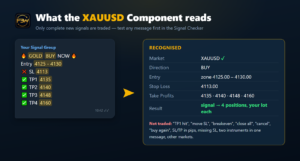
The Component is the gold (XAUUSD) module of the ForexBotWorks Engine. It follows the Telegram group you connect to it. It recognises complete gold signals, checks them against the live price and opens one position per Take Profit in your MT5 account. Then it manages every signal until its last position is closed. Every step and every refused signal is written to the Dashboard event log with its reason.
What it reads
- Gold, in common spellings: XAUUSD, XAU/USD, XAU USD, XAU, GOLD, including broker styles such as XAUUSD.pro, XAUUSDm or XAUUSD#.
- Direction: BUY / SELL, LONG / SHORT, “Buy now”, “Sell now”.
- Entry: a price (
Entry 4128,@ 4128), a zone (4125 - 4130) or market (now,market price). - Stop Loss:
SL,S/L,Stop Loss,Stop,Invalidation… - Take Profits: TP1…TPn, Target 1, Take Profit 1, as one list or one per line.
- Emojis, bold text, extra lines, thousands separators (
4,130) and labels in other common forms do not matter.
What it does not execute
Only a complete new signal is traded: gold, direction, Stop Loss and at least one Take Profit. These messages are never traded. Most of them appear in the log with the reason:
- updates and management: “move SL”, “breakeven”, “trailing”, “new SL”, partial-close instructions
- results: “TP1 hit”, “SL hit”, “closed in profit”
- “close all”, “cancel”, “do not buy”, “no trade”, “coming soon”
- re-entry messages (“buy again”, “add more”)
- messages with two instruments, each with its own direction
- signals with a missing or zero SL/TP, levels given in pips, or SL/TP on the wrong side
- other markets: a Component trades only its own market
- edits of an already posted message
BUY LIMIT / SELL STOP and similar pending orders are executed at market, and only when the price is within the entry filter. The log notes this.
Fixed trading rules
The rules are built into the Component and are the same for every customer. You set only the lot size.
| Entry filter | The market price must be within 25.00 of the signal entry. For a zone it must be inside the zone or within 25.00 of its edge. Otherwise: no trade (“Price too far from entry”). |
|---|---|
| Plausibility | SL and every TP must be within 15 % of the current price. The SL must be on the losing side of the market. |
| Positions | One market position per TP, each with your lot size, the signal’s SL and its own TP. TPs the price has already passed are skipped. |
| Broker limits | The lot is rounded down to your broker’s volume step. An SL inside the broker’s minimum stop distance means no trade, and TPs inside it are skipped. |
| Duplicates | The same message, or the same signal again within 30 minutes, is not traded twice, even after a restart. |
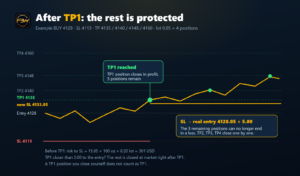
| After TP1 | When the price reaches TP1 (or the TP1 position is closed at its TP), the SL of all remaining positions of that signal moves to the real average entry price + 5.00 (BUY) or − 5.00 (SELL).
|
| Manual actions | If you close the TP1 position yourself before TP1, this is not treated as TP1. The other positions keep their SL and TP. |
| Own positions only | The Component manages only positions with its own magic number (777889). Manual trades and other EAs are never touched. |
Example
Signal: XAUUSD BUY 4128 · SL 4113 · TP1 4135 · TP2 4140 · TP3 4148 · TP4 4160, your lot size 0.05:
- The price is 4128.05, within 25.00 of the entry, so 4 positions of 0.05 lot open (0.20 lot in total).
- Risk to the original SL: 15.05 × 100 oz × 0.20 lot ≈ 301 USD (contract size 100 at most brokers; the Dashboard shows yours).
- The price reaches 4135: TP1 closes with profit. The SL of the other 3 positions moves to 4133.05, so they can no longer end in a loss.
- TP2, TP3 and TP4 close one by one, or the rest closes at 4133.05. Every closure is reported in the event log.
- If a provider’s TP1 is closer to the entry than 5.00 (for example TP1 4131), the new SL would be above the price at TP1. The remaining positions are then closed at market right after TP1, keeping the profit made so far.
Your risk per signal = lot size × number of TPs. Choose the lot with that in mind, and start on a demo account.
Not sure your provider’s format is supported? Paste a message into the Signal Checker. It uses the same recognition rules as this Component.
License
- Lifetime, no subscription. It covers all V1.x releases.
- Standard: 1 trading account + 1 device. Professional (3 accounts) and Business (10 accounts) editions have the same features.
- The license is checked by the Engine and again inside the Component (signed by our license server, bound to your MT5 account and device).
- 2 free account or device changes per license per year, via Support.
- 30-day money-back guarantee. A refund deactivates the license.
- Gold and silver are also offered together as the Metals bundle (XAUUSD + XAGUSD).
Requirements
- ForexBotWorks Engine V1.0 (free) on Windows 10/11
- MetaTrader 5 with a gold symbol at your broker (found automatically, or set the broker symbol in the Dashboard)
- A Telegram group or channel that posts gold signals, with your Telegram account as a member
Installation
- Download the Component in My Account → Downloads. Your license key is in My Account, where you also link your MT5 account.
- Unzip it into the Engine folder
engine\components. The result isengine\components\xauusd\. - In the Dashboard, press Refresh Components, then enter your license key, Telegram group (ID, @username or t.me link) and lot size, and save.
- The Component card shows: license active, Telegram group registered, broker symbol found.
What stays your decision and your risk
You choose the signal provider, the account and the lot size, and you carry the trading risk. The Component executes the provider’s signals within the rules above. It does not create signals, does not predict the market and does not promise profit. See the Engine page for the full list of what is our responsibility and what is yours.
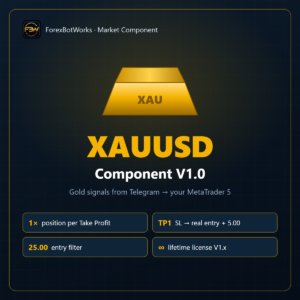
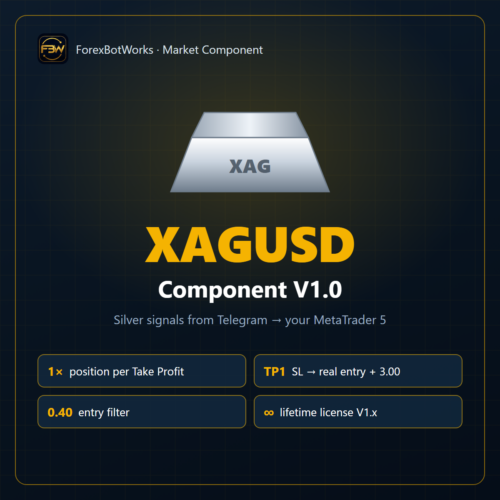
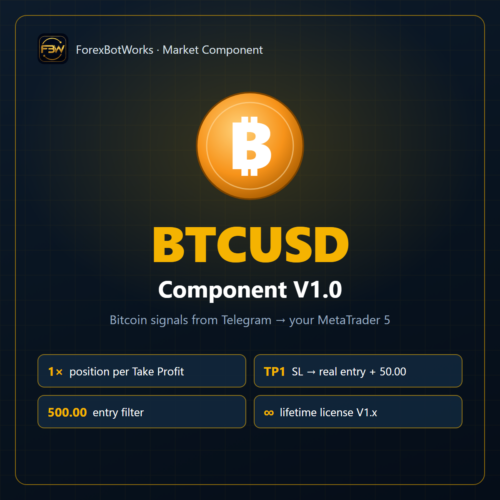
XAUUSD Component V1.0 · Market: Metals · Requires ForexBotWorks Engine V1.0 · Lifetime license for V1.x
Reviews
There are no reviews yet.